OilTrails Is Evolving: A Massive Update Across All Platforms
What started as a small web update became one of our biggest projects yet.
May 22, 2026
First off, sorry for the long period of silence.
Although things may have looked quiet from the outside over the past couple months, we’ve actually been working very hard behind the scenes.
What originally started in December as a fairly straightforward website update quickly spiraled into something much bigger. At times, honestly, it felt a little out of control, in a good way. One feature led to another, then another, and before long we found ourselves rebuilding and expanding systems across all platforms.
And while we’re still not quite ready to fully pull the curtain back, we wanted to finally check in and share some of what’s been happening.
Over the next days and weeks, we’ll be posting more focused articles covering specific upgrades and features in detail. But for now, here’s a quick overview of what’s already been added, or will be arriving shortly, to OilTrails.
A Full Featured OilTrails Web App
What began as a simple browser-based trip planner evolved into something much larger:
A full web experience that captures the core OilTrails workflow while introducing entirely new planning and organizational tools.
The web app now includes many of the features users expect from OilTrails, including:
- LSD / NTS lookup
- Well data
- Weather integration
- Satellite and terrain mapping
- Saved locations
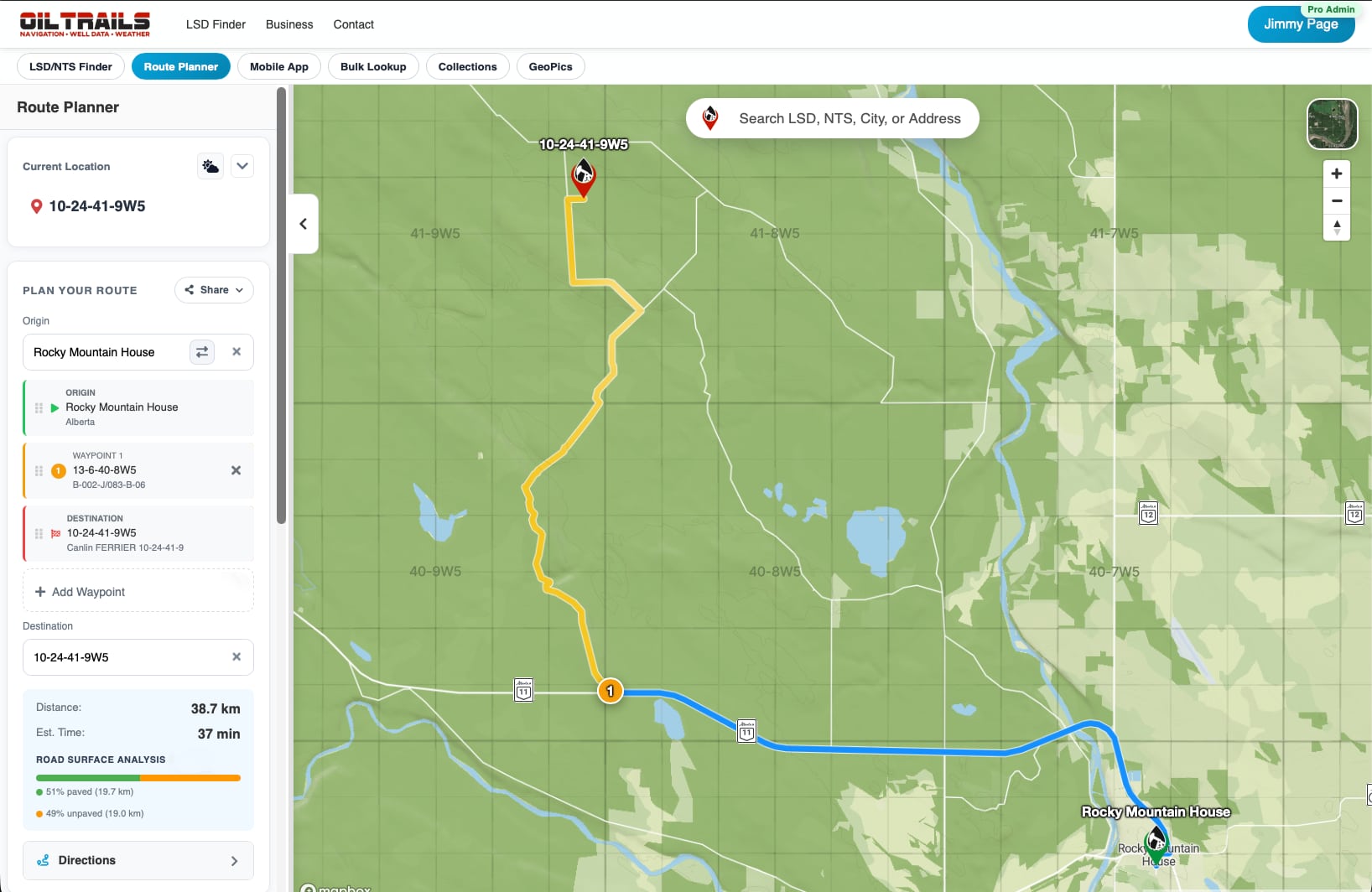
- Route planning
Check it out at oiltrails.ca/nav and stay tuned for a more detailed walkthrough of the web app coming soon.
But beyond that, it also introduced several new capabilities that will soon begin making their way into the mobile apps as well.
A Smarter Oilfield Trip Planner
The original web planner was designed to quickly build routes in a browser. However, it quickly expanded into a much more capable planning tool.
Routing now supports:
- Multiple waypoints
- Drag-and-drop stop reordering
- Route flipping
- Pin-drop destination selection
- Current-location routing
- Improved route instructions and markers
The goal was simple: Make it easier to build realistic field routes that match how work actually happens in the oilfield.
Printable & Shareable Routes
One of the biggest additions has been the ability to move routes cleanly between the office and the field.
You can now:
- Share routes
- Print directions
- Export PDFs
- Generate QR-linked route handoffs
This has become one of the more exciting workflows internally because it bridges the gap between planning and execution in a way we’ve wanted to achieve for years.
Bulk LSD & Location Lookups
Another major addition is bulk location processing.
Instead of looking up sites one at a time, users can now:
- Upload files
- Paste mixed location lists
- Run bulk LSD/NTS lookups
- Generate summaries
- Save or map results directly
This has opened the door for much larger planning workflows and team coordination scenarios.
Collections & Project Organization
Saved locations are now much more structured.
We introduced a system originally called Projects, later renamed Collections, allowing users to organize:
- Routes
- Locations
- Related work
- Repeat jobs
- Crew-specific planning
This became especially important as the platform evolved beyond simple location lookup into a broader field operations toolkit.
GeoPics Expanded to the Web
GeoPics is no longer just a mobile feature.
The web platform now supports:
- GeoPics browsing
- Image viewing
- Sharing workflows
- Download/export support
- Project-linked photo organization
This is laying the groundwork for much larger plans we have around GeoPics moving forward.
Road Surface & Route Intelligence
We’ve also been experimenting heavily with route intelligence and surface-aware planning.
Routes can now display:
- Surface breakdowns
- Road condition information
- Color-coded route sections
- Terrain-aware insights
This feature still feels like the beginning of something much bigger.
We recently made a major breakthrough around how map layers and overlays can be presented in a performant and scalable way. Honestly, it feels like we’ve only scratched the surface there.
For now, we’re going to monitor how users interact with these new routing insights and map layers before expanding them further across to mobile.
New Map Layers & Grid Overlays
One of the most requested features over the years has been better map overlays.
OilTrails now supports:
- Terrain views
- Satellite layers
- Thumbnail-based layer selection
- DLS grid overlays
- NTS grid overlays
These overlays have become a major focus internally because they fundamentally change how users interact with oilfield maps.
And this technology will continue expanding.
Unified Accounts, Billing & Teams
We also rebuilt much of the account system from the ground up.
This includes:
- Modern signup/login flows
- Magic-link support
- Better password recovery
- Improved validation and error handling
- Unified account syncing across platforms
On top of that, we introduced:
- A new pricing system
- Stripe-based subscriptions
- Self-serve billing management
- Team and seat-based account controls
This also laid the foundation for OilTrails Pro, allowing companies to manage multiple users under a single organization and expanding access to advanced features across the board.
Please note that the normal subscription will still grant access to all the core features of the platform, including the web app, but some of the more advanced capabilities will be reserved for Pro users looking to do advanced planning or manage teams.
Better Mobile Handoff & Onboarding
We wanted the transition from web to mobile to feel much smoother.
The platform now includes:
- Dedicated onboarding flows
- Purchase success pages
- Mobile download handoff pages
- Deep-link support into the apps
The idea was to make moving between devices and platforms feel seamless.
Still A Work In Progress
Even with all this progress, there’s still a lot happening behind the scenes.
Some systems are finished. Some are evolving. And some features have grown into something much bigger than originally planned.
At times, it honestly feels like we have a dozen moving pieces all in the air at once.
But that’s also what makes this period exciting.
OilTrails is no longer just a simple navigation app. It’s evolving into a much broader platform for oilfield planning, organization, navigation, and field operations.
Thank You
Finally, thank you.
A huge amount of what’s being built right now comes directly from user feedback, feature requests, support emails, and conversations with people working in the field every day.
We genuinely appreciate the support and patience while we work through one of the biggest upgrades OilTrails has ever seen.
And please bear with us as we continue to roll out new features, share more details, and work through the inevitable bugs and issues that come with such a large update. We love hearing from users, so please keep the feedback coming.
More soon.
The OilTrails Team