Printable Directions and PDF Exports for Field Work
How to turn an OilTrails route into copyable directions, a printed handoff, or a PDF.
July 7, 2026
For dispatchers, safety staff, administrators, and field users, printable directions and PDF exports for field work are a practical workflow issue.
In oilfield work, paper is still useful when the route needs to survive weak signal, job packets, and shift handoffs.
OilTrails lets you copy directions, print a formatted route page, or export the route to PDF so the driver has clear instructions before leaving the yard.
How To Create Printable Directions
Start by planning the route on the navigation page.
Once the route is ready, click Share.
From there, choose the handoff format that fits the job:
- Copy Directions when you want plain directions for a message, email, dispatch note, or work order.
- Print Directions when you want a formatted printed page. This is an OilTrails Pro option.
- Export to PDF when you want a formatted file that can be emailed, archived, or added to a digital job packet. This is also an OilTrails Pro option.
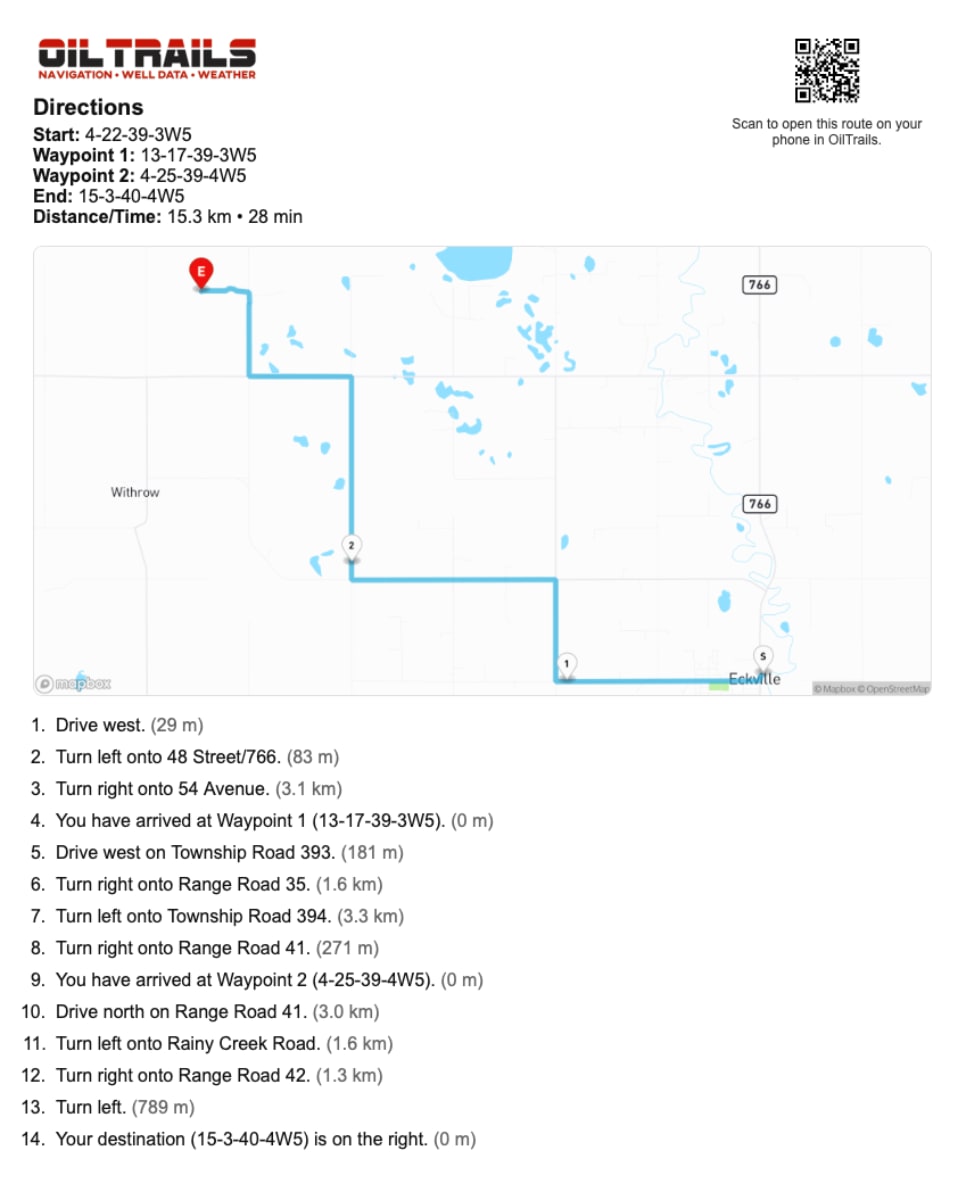
The print and export options create a formatted route page with the information a driver should need, including a map, turn-by-turn directions, distances, and a QR code they can scan to open the route on their own device.
Step 1: Plan The Route
Open the navigation page and build the route the way you want the driver to receive it.
Confirm the destination, stop order, and final approach before sharing anything. If the route depends on a specific access road, lease road, gate, or yard sequence, check the map closely before exporting.
Step 2: Open The Share Menu
After the route is planned, click Share.
The share menu is where OilTrails turns the route into something another person can use. You can send the route digitally, copy the directions, print the route, or export it as a PDF depending on what the handoff requires.
Step 3: Choose The Right Output
Use Copy Directions when the driver only needs the written instructions or when another system needs the route text.
Use Print Directions when the route should go into a job package, safety folder, truck binder, or morning dispatch handout.
Use Export to PDF when the route needs to be emailed, stored with a ticket, attached to a job record, or shared with someone who may print it later.
For Pro users, the printed and PDF versions are the most complete handoff because they package the route map, directions, distances, and mobile QR access together.
Step 4: Hand It Off To The Driver
Before sending or printing the route, make sure the directions match the route you want used in the field.
If you are handing off a printed page, point out the QR code. The driver can scan it to open the route on their device, which keeps the paper backup and mobile route connected.
If you are sending a PDF, make sure the driver knows whether the PDF is the primary instruction, a backup, or part of a larger job package.
Why Paper Still Shows Up In Field Work
A printed route can go into a job package, safety folder, or truck binder.
It is useful when the driver may lose service, switch devices, or need a quick reference without opening another app.
That does not make paper better than GPS. It makes it a practical fallback.
What To Include Before Exporting
Confirm the destination, stop order, and obvious map context before exporting.
Check satellite or terrain if the final approach looks uncertain.
If the route will be handed to someone else, include enough context that they understand what was planned.
Where PDFs Fit Best
PDFs are useful for dispatch records, job packages, and routes that need to be emailed or archived.
Printed directions are useful when crews want something visible in the truck.
Digital route links remain better when the receiver needs to open live navigation on a phone.
A Practical Field Habit
The most useful OilTrails workflows are usually simple enough to repeat under pressure. Search the location, review the map, add the route context that matters, and make sure the person doing the work receives something they can trust.
Digital route planning still needs practical backup artifacts. In practice, that means using the feature as one more way to reduce uncertainty before the work reaches the field. It does not replace local knowledge, current field conditions, or company procedures. It gives users better context before they commit time, fuel, equipment, or another worker’s day to a route or location.
Key Takeaways
- Plan the route on the navigation page before creating directions.
- Use Share to copy directions, print directions, or export a PDF.
- Printed and PDF route pages include a map, directions, distances, and a QR code for mobile access.
- Keep digital and paper handoffs aligned so crews are not comparing conflicting directions.
Create route directions from the OilTrails navigation page.