Easier Location Search and Cleaner Map Controls on OilTrails Web
Find LSD and NTS locations with visual pickers, keep search results on the map, and see your current position.
October 13, 2026
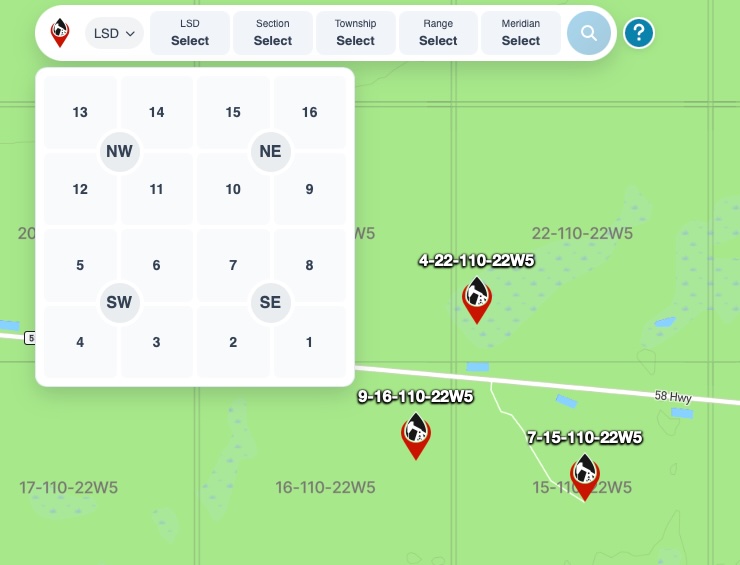
When dispatch sends over another LSD or NTS location, you should be able to look it up without losing the locations you’ve already checked. The latest updates to the OilTrails navigation page make searching, keeping results on the map, and working from a smaller screen easier.
Choose how you search
You can now switch between General Search, LSD, and NTS. Use General Search to type or paste a location, or choose a dedicated LSD or NTS search to build the reference using visual pickers.
The pickers follow the arrangement of the survey grids, putting selections in a familiar layout. If you’re entering a land description from a field ticket or dispatch message, you can select its parts and review the reference before searching.
More room to work on mobile
The mobile search layout has been adjusted, with clearer button spacing and revised help placement. These changes make the search controls easier to use when you’re reviewing a location on your phone.
The Route Planner drawer now opens above the search bar, keeping the planner accessible without covering the search controls.
Keep the locations you’ve already found
Completed search pins and labels now stay on the map until you remove them. You can search for the next location and still see the results you’ve already checked, which is useful when reviewing several wellsites for the same job.
Duplicate and temporary markers are cleaned up so they don’t clutter the map as you search.
See your current position
A new current-location button shows your position with a pulsing blue marker. It gives you a visible reference for where you are relative to the locations on the map.
Once you grant location permission, your position appears automatically on future visits, provided your browser still allows location access. You won’t need to press the button each time you return.
Open the OilTrails navigation page to try the updated search controls with your next LSD or NTS lookup.