Multi-stop routes
Build browser routes with up to 10 waypoints and reorder stops as the plan changes.
OilTrails Pro
Your crews already know OilTrails. Pro gives your team individual access while adding the browser planning tools needed to prepare, organize, and hand off more complex field work.

Team Access
Team access is managed from the OilTrails account area. A Pro admin can adjust the number of seats, assign each seat to an email address, and update assignments as the crew changes.
Each person signs in with their own OilTrails account. There is no shared password to distribute, and the administrator has a clear place to manage who has access.
Pro account
The account administrator can review seats and team access in one place.
Advanced Browser Planning
OilTrails for Browsers gives coordinators, dispatchers, and field leaders more room to prepare routes, organize locations, and create a clear handoff before anyone leaves the yard.
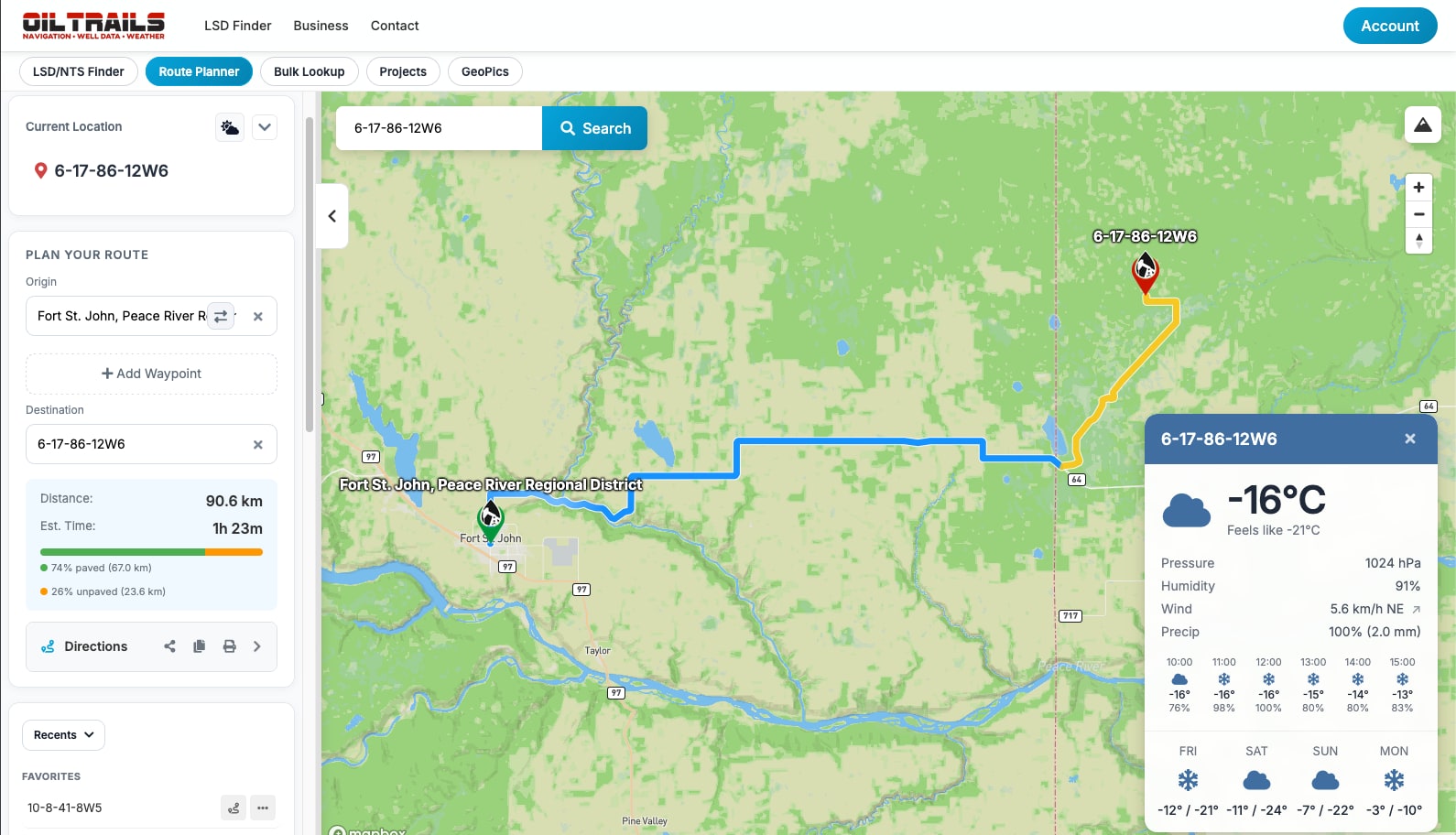
Build browser routes with up to 10 waypoints and reorder stops as the plan changes.
Organize saved locations, routes, and recurring field work into useful groups.
Send prepared route context to the people who need to review or drive it.
Print directions or export a PDF with route details and a QR handoff.
Upload a file or paste a list to process many LSD, NTS, or coordinate entries together.
Review weather and road surface analysis while preparing the trip.
Keep location-based field photos available for viewing and sharing across the team.
Use LSD and NTS grid overlays with terrain and satellite views for added context.
One Connected Workflow
Pro connects the planning that happens at a desk with the OilTrails experience your team already uses in the field.
Search locations, build the route, review conditions, and organize the work.
Keep route and location context available to the assigned office and field users.
Open OilTrails on mobile for the navigation and offline tools crews already know.
Already subscribed in the app?
App Store and Google Play subscriptions do not support OilTrails multi-seat team subscriptions. If your current OilTrails subscription is managed by Apple or Google, contact our team before making any changes.
We will review your current subscription and guide you through the move to an OilTrails Pro team account. This keeps the process clear and helps avoid an unnecessary interruption to your access.
Contact Our TeamLet us know whether Apple or Google manages the current subscription.
Our team will check the current subscription path and explain the next steps.
We will guide you through the move and help you get ready to assign seats.
Common Questions
The Pro account administrator manages the seat count and email assignments from the account area.
No. Each assigned user signs in with their own OilTrails account and email address.
The full planning workspace is available in the browser, while mobile remains ready for field navigation.
Contact the OilTrails team before changing the subscription so we can guide the migration.
Your Next Step
Use the path that matches what you need to do today.